
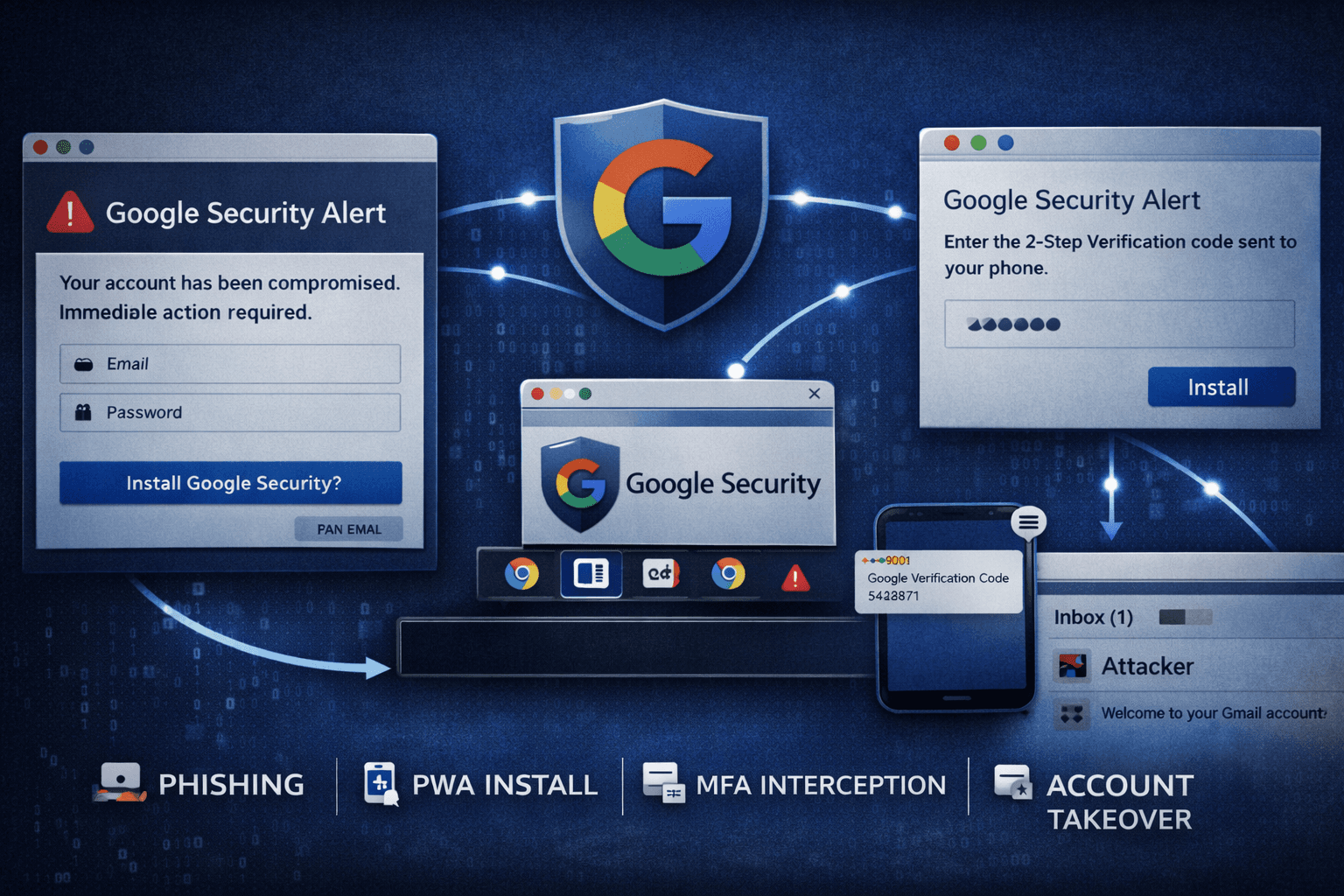
A new wave of phishing campaigns is exploiting browser technology most users have never heard of — and the results are devastating. In early 2025, security researchers documented attacks using Progressive Web Apps (PWAs) to impersonate Google Security alerts, steal login credentials, and intercept multi-factor authentication (MFA) codes in real time. Unlike traditional phishing pages that disappear when you close a tab, these rogue apps persist on your device like native software.
The technique is alarmingly effective. According to recent threat intelligence reports, credential-harvesting attacks leveraging browser APIs increased by over 30% year-over-year (CISA Threat Report, 2024). For identity security professionals protecting Google Workspace tenants, this attack chain represents one of the most technically sophisticated browser-based threats observed in the wild.
In this article, you'll learn exactly how PWA-based phishing attacks work, why they evade traditional defenses, and what concrete steps your organization can take to detect and stop them before accounts are compromised.
How PWA Phishing Attacks Work: The Full Attack Chain
Understanding the mechanics of this attack is the first step toward building effective defenses. The campaign documented by BleepingComputer targets Gmail and Google Workspace users through a carefully engineered social engineering sequence.
Stage 1: The Lure and Fake Login Page
The attack begins with a phishing link delivered via email, SMS, or a compromised website. The victim is directed to a site that closely mimics Google's official security alert interface — complete with Google branding, color schemes, and urgent language such as "Your account has been compromised. Immediate action required."
The fake login page captures:
- Google account email and password
- Responses to security challenge prompts
- Session tokens when available via overlay injection
The visual fidelity is high enough to defeat users who check for HTTPS and inspect the page layout. Attackers register domains using typosquatting or abuse legitimate hosting platforms to further reduce suspicion.
Stage 2: The PWA Installation Prompt
After the fake login, the site triggers a browser prompt to install a PWA. To the victim, this appears as a legitimate "Google Security" app being installed for account protection. In reality, it installs attacker-controlled code directly onto the device.
PWAs can be installed on Windows, macOS, Android, and iOS through browser install APIs — no app store required, no administrative privileges needed on many configurations. Once installed, the app:
- Runs independently of the browser session
- Persists across reboots via service worker registration
- Displays its own taskbar/dock icon
- Operates offline using cached malicious scripts
Stage 3: Credential Harvesting and MFA Interception
With the rogue PWA running, attackers deploy multiple harvesting techniques simultaneously:
- Keylogging overlays capture keystrokes within the fake app interface
- Session replay records user interactions for later review
- MFA SMS interception prompts victims to enter one-time codes under the pretense of account verification
- Push notification abuse creates fake MFA approval requests
The attack chain culminates in full account takeover, typically within minutes of the initial lure click.
Table: PWA Phishing Attack Chain Stages
| Stage | Attacker Action | Victim Experience | Data Captured |
|---|---|---|---|
| 1. Lure | Phishing link delivery | Urgent security alert | None yet |
| 2. Fake Login | Credential harvesting page | Google sign-in form | Username, password |
| 3. PWA Install | Browser install API trigger | "Google Security" app prompt | Persists on device |
| 4. Harvesting | Keylogging + overlays | Normal app usage | MFA codes, keystrokes |
| 5. Takeover | Session token replay | Account access lost | Full account control |
Why PWAs Evade Traditional Security Defenses
The reason this attack technique is gaining traction among threat actors is its remarkable ability to bypass conventional security controls. Most enterprise defenses simply weren't designed with browser-native app abuse in mind.
Browser Warning Suppression
Standard phishing pages often trigger Google Safe Browsing or Microsoft SmartScreen alerts. PWA install flows, however, originate from browser-native UI — the same interface used by legitimate apps like Twitter (X), Starbucks, and Spotify. This means the install prompt itself carries an implicit trust signal that browsers do not flag.
Important: Chrome, Edge, and other Chromium-based browsers display PWA install prompts as a first-party browser UI element. Users have been conditioned to accept browser prompts, making this a high-trust social engineering vector.
Persistence Without Traditional Malware Indicators
Traditional endpoint detection and response (EDR) tools look for suspicious executables, DLL injections, and registry modifications. PWAs leave none of these artifacts. They run inside the browser's sandboxed environment, use service workers for background persistence, and store data in browser-native storage APIs — behaviors indistinguishable from legitimate PWA usage.
Security teams hunting for indicators of compromise (IOCs) face a significant challenge: rogue PWAs look identical to legitimate ones at the file system and process level.
MFA Bypass via Real-Time Relay
This attack doesn't just steal passwords — it defeats MFA. When attackers use real-time adversary-in-the-middle (AiTM) proxying combined with the PWA's keylogging overlay, they can relay credentials and MFA codes to the real Google login page simultaneously. This creates a valid authenticated session for the attacker before the victim realizes anything is wrong.
SMS-based MFA is particularly vulnerable because victims are socially engineered into entering codes directly into the rogue app interface.
Table: MFA Method Resistance to PWA-Based AiTM Attacks
| MFA Method | Resistance Level | Attack Pathway | Recommended? |
|---|---|---|---|
| SMS OTP | Low | Real-time relay via overlay | No |
| TOTP (Authenticator app) | Low-Medium | Relay within 30-second window | Conditional |
| Push notification | Medium | Fake push approval screen | Conditional |
| Hardware security key (FIDO2) | High | Phishing-resistant by design | Yes |
| Passkeys | High | Bound to origin domain | Yes |
Detecting Rogue PWA Activity in Your Environment
Detection requires visibility into browser-level activity that most security teams don't currently monitor. The following approaches provide actionable coverage against this threat class.
Hunting Anomalous Service Worker Traffic
Service workers are the backbone of PWA persistence. When a rogue PWA is installed, it registers a service worker that intercepts network requests and can operate offline. You can hunt for malicious service workers by:
- Auditing browser extension and PWA inventory across managed endpoints using enterprise browser policies
- Monitoring for service worker registrations from domains not on an approved list
- Reviewing Chrome Enterprise or Edge for Business logs for unexpected PWA installations
- Alerting on service worker activity originating from recently registered or low-reputation domains
Correlating Identity and Browser Signals
Cross-referencing identity provider (IdP) logs with browser telemetry reveals account takeover patterns that neither source alone would surface:
- Impossible travel events following PWA installation on a device
- New session tokens appearing from a different IP within seconds of a legitimate login
- MFA code submissions from devices with no prior enrollment history
- Google Workspace Admin audit logs showing OAuth token grants to unfamiliar apps
Pro Tip: Google Workspace administrators can enable "Context-Aware Access" policies to block sessions that don't meet device trust requirements, reducing the blast radius of stolen session tokens.
Indicators of Compromise to Monitor
Key signals in your SIEM and endpoint telemetry:
- Browser process spawning child processes with unusual network connections
- Service worker cache storage containing obfuscated JavaScript
- PWA manifest files referencing domains impersonating major tech brands
- Unusual POST requests to attacker infrastructure from browser-context processes
- MITRE ATT&CK T1566 (Phishing) and T1185 (Browser Session Hijacking) trigger combinations
Mitigation Strategies for Enterprise Security Teams
Defending against PWA phishing requires a layered approach that spans technical controls, policy enforcement, and user education. No single control is sufficient on its own.
Technical Controls
Apply these controls at the enterprise level to reduce attack surface:
- Block PWA installations via Chrome Enterprise policies (
WebAppInstallForceListand blocking unapproved origins) - Enforce phishing-resistant MFA — migrate from SMS OTP to FIDO2 hardware keys or passkeys for all privileged accounts
- Deploy enterprise browser management (Chrome Enterprise, Edge for Business) with policy enforcement for service worker permissions
- Enable Google Advanced Protection Program for high-value accounts including executives, IT administrators, and finance personnel
- Implement certificate pinning where applicable to prevent AiTM proxy interception
Security Awareness Training
Technical controls alone won't stop every attack. Your users are the last line of defense when controls fail.
Train employees to recognize:
- Unsolicited PWA install prompts, especially those claiming to be security tools
- Urgency-based social engineering language mimicking Google, Microsoft, or IT support
- Browser prompts requesting permissions to notifications, clipboard, or device sensors from unfamiliar sites
- The difference between a browser-based prompt and a legitimate app store installation
Incorporate PWA install simulations into your phishing simulation program. Most commercial phishing simulation platforms do not yet include PWA vectors — building a custom scenario provides high-value awareness training that directly mirrors active threat techniques.
Compliance and Framework Alignment
This attack class is relevant to multiple regulatory frameworks:
Table: Compliance Framework Mapping for PWA Phishing Controls
| Framework | Relevant Control | Control Description | Priority |
|---|---|---|---|
| NIST CSF 2.0 | PR.AA-05 | Identity assertions bound to origin | High |
| CIS Controls v8 | Control 4 | Secure configuration for browsers | High |
| ISO 27001 | A.8.5 | Secure authentication management | High |
| MITRE ATT&CK | T1185, T1566 | Browser session hijacking, phishing | Critical |
| GDPR / HIPAA | Data protection | Credential theft = reportable breach | Mandatory |
Key Takeaways
- Block PWA installations from unapproved origins using enterprise browser management policies before an incident forces your hand
- Migrate high-risk accounts to FIDO2 or passkeys immediately — SMS and TOTP MFA are defeated by real-time AiTM relay attacks
- Hunt for rogue service workers by monitoring browser telemetry for registrations from unrecognized or low-reputation domains
- Add PWA install simulation scenarios to your phishing awareness program to close the training gap before attackers exploit it
- Correlate IdP logs with browser telemetry to surface impossible travel and session hijacking patterns that indicate post-compromise activity
- Treat browser API abuse as a first-class threat category — your EDR and network controls were not designed to catch it alone
Conclusion
PWA-based phishing represents a meaningful evolution in browser-based attack techniques. By abusing legitimate browser install APIs, attackers achieve persistence, keylogging capability, and MFA interception without deploying a single line of traditional malware. The attack chain targeting Gmail and Google Workspace users is technically sophisticated, visually convincing, and designed to defeat the security controls most organizations currently rely on.
The good news is that effective defenses exist today. Phishing-resistant MFA, enterprise browser policy enforcement, and targeted user awareness training collectively close the most exploitable gaps. Security teams that invest in browser telemetry and identity correlation will detect this activity before full account takeover occurs.
Start by auditing your MFA posture for privileged accounts, then review your browser management policies for PWA controls. Those two steps alone will significantly reduce your exposure to this growing threat class.
Frequently Asked Questions
Q: What is a Progressive Web App (PWA) and why is it dangerous in this context?
A: A PWA is a web application that uses modern browser APIs to behave like a native app — it can be installed on a device, run offline, and send push notifications. In phishing attacks, rogue PWAs are dangerous because they persist on the device after installation, run outside the browser tab, and can execute malicious scripts like keyloggers without triggering traditional malware detection tools.
Q: How can I tell if a PWA install prompt is legitimate or malicious?
A: Legitimate PWA prompts only appear on domains you intentionally navigated to, and they should match the official domain of a known service. Be suspicious of any install prompt that appears after clicking an emailed link, especially one claiming to be a security tool from Google, Microsoft, or your IT department. When in doubt, close the browser and navigate directly to the official site.
Q: Does using Google Chrome's built-in security features protect against this attack?
A: Chrome's Safe Browsing and phishing filters provide some protection, but they cannot catch every malicious site — especially newly registered domains or those abusing legitimate hosting infrastructure. Chrome is beginning to flag rogue PWAs, but enterprise-grade protection requires supplementing browser defaults with Chrome Enterprise policies, advanced MFA, and endpoint telemetry monitoring.
Q: Which types of MFA are actually resistant to this attack?
A: FIDO2 hardware security keys and passkeys are the most resistant because they are cryptographically bound to the legitimate origin domain. Even if an attacker captures credentials and a one-time code in real time, they cannot use them on a different domain. SMS OTP and TOTP authenticator codes are vulnerable because they can be relayed to the real site within their validity window.
Q: How should security teams incorporate this threat into phishing simulations?
A: Build a custom simulation scenario that mimics the attack flow: a lure email, a fake branded login page, and a PWA install prompt. Measure not just click rates but PWA installation rates, as the latter represents the higher-risk behavior. Use the simulation results to identify users who need targeted training on browser install prompts and urgency-based social engineering tactics.

Enjoyed this article?
Subscribe for more cybersecurity insights.